Alpha · Coming soon to macOS and Windows

Lyrics for everyone
in the room.

Praise Vision is live presentation software for churches. Lyrics, scripture, slides, images and video on any number of screens, with songs and scripture in two languages at once.

For macOS (Apple Silicon and Intel) and Windows

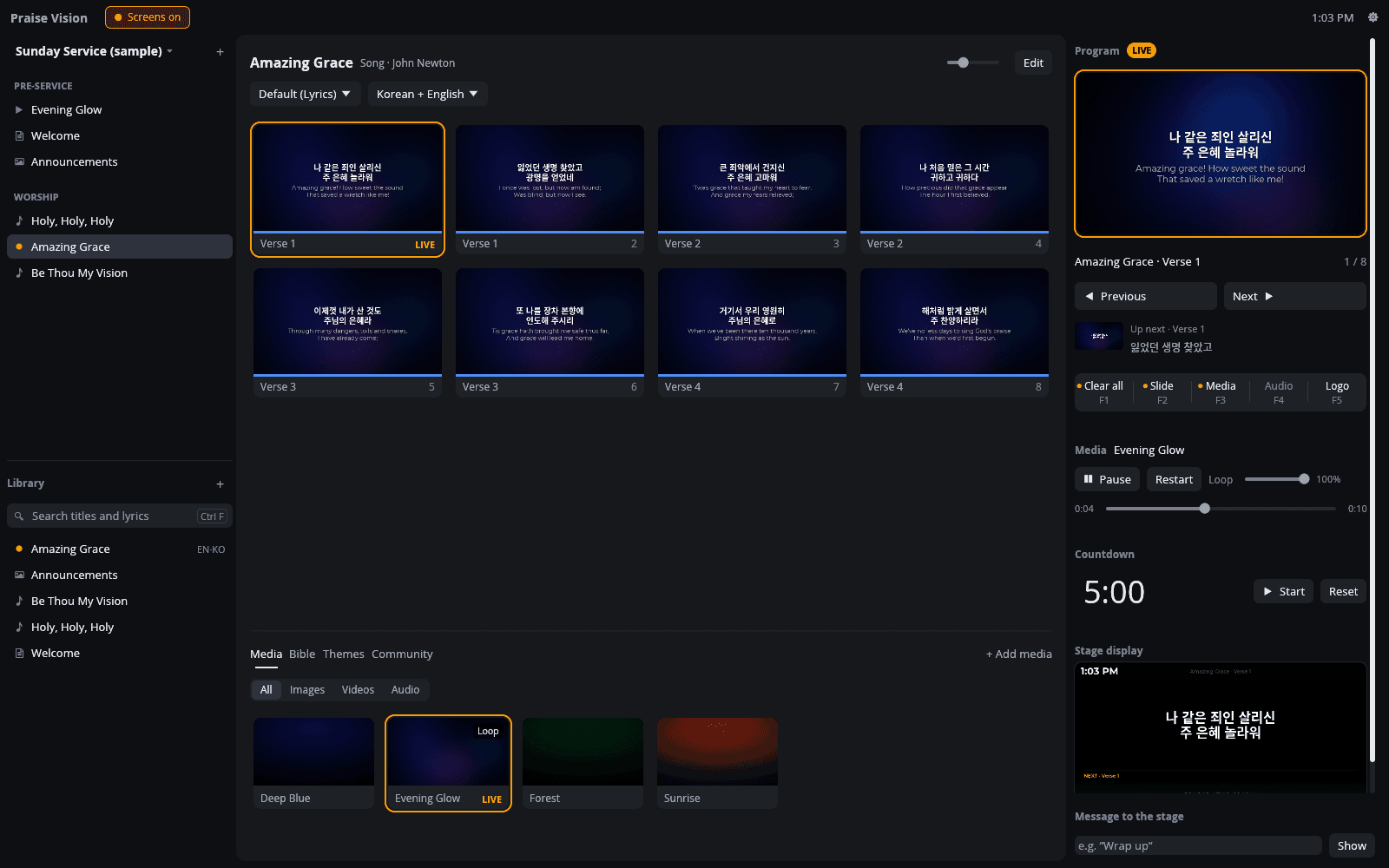
The Praise Vision operator window during a service: the playlist and library on the left, the slides of Amazing Grace in Korean and English in the middle with the first slide live, and the program preview, show controls, countdown and stage display preview on the right.
The operator window, with the audience screen and the stage display it controls.
Audience한국어 / English
Stage display

120+ languages, any script.

Songs can be in any of 124 languages, each written its own way, or in one you add by name. Find yours

01Multilingual services

Built for churches that worship in more than one language.

Every translation lives inside the song. Each service picks the two languages on screen, and the audience screen and stage display follow.

Every language, side by side.

Edit a song with each translation in its own column, slide by slide, so nothing drifts out of place. Add a language in one click.

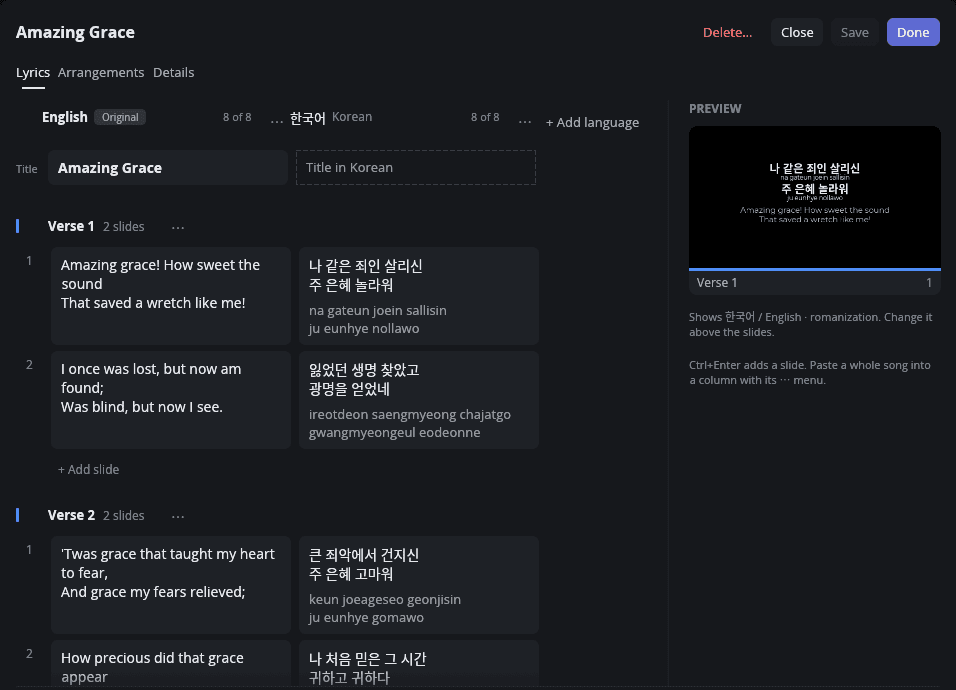
  1. A column for every languageAdd one by typing part of its name, in English or its own script. Each sits next to the original, with a count of the slides it covers.
  2. Romanization as you typeIt appears greyed under each line. Type over it to correct it.
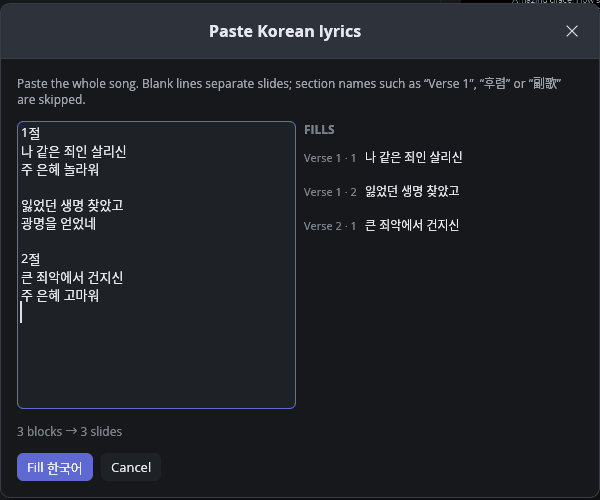
  3. Paste a whole translationBlank lines separate slides, and section names like “Verse 1”, “후렴” or “副歌” are skipped.
The song editor for Amazing Grace: English lyrics in one column, the Korean translation in the next with its romanization greyed underneath, an Add language button, and a preview of the bilingual slide.
The Paste Korean lyrics dialog: a whole Korean translation pasted in, with section names skipped and each block mapped to a slide.

Any language, in its own script.

Choose from 124 languages in one searchable list. Type part of a name in English or in its own script, or a common name like “Chinese” or “Farsi”. If yours isn’t listed, add it by name.

  • Every script on screenArabic, Hebrew, Hindi and the other Indic scripts, Thai, Lao, Khmer, Myanmar, Tibetan, Amharic, Georgian and Armenian all display in the operator window, using your computer’s fonts.
  • Detected for youA song’s language is detected from its lyrics when you import it, and follows what you type in a new song until you choose one.
  • Romanization where it helpsPronunciation in Latin letters is available for Korean, Mandarin, Cantonese and Japanese kana.
English Original한국어
Try

Choose the two languages on screen.

Pick the top and bottom language once for the whole service, and every song follows. A song can still make its own choice. Try it:

Languages on screen
TopBottom

Under 한국어 (Revised Romanization)

Updates the live screen

Sing along, even if you can’t read the script.

Turn on romanization and the pronunciation appears under each line, in Latin letters, for everyone who speaks the language but never learned to read it.

  • 은혜
    eunhye
    KoreanRevised Romanization
  • 恩典
    ēn diǎn
    MandarinPinyin
  • 恩典
    jan1 din2
    CantoneseJyutping
  • めぐみ
    megumi
    JapaneseHepburn

Mandarin and Cantonese are separate languages

Mandarin can be Simplified or Traditional, and Cantonese is a language of its own, with Jyutping instead of pinyin. Korean uses Revised Romanization, the official system. Mandarin gets pinyin with tone marks (with Taiwan readings for Traditional), and Japanese kana get Hepburn.

Any line can be corrected by hand

Kanji readings need a person, so a Japanese line with kanji waits for you. Type the reading once and it’s kept, the same way you’d fix any other line.

Example: the line 主の恵み gets the reading “shu no megumi”, typed by hand.

Find songs however they’re typed

Search your library by any title or lyric: in Hangul, Chinese characters or kana, by romanization (“na gateun”, “ping an”), by Korean initial consonants, or in either kind of Chinese characters. Accents and tone marks are optional.

02Stage display

Everyone on stage knows what’s next.

A confidence monitor for musicians and speakers, in both languages. Send a message to the stage and only the stage sees it.

Slide
1 / 8
Countdown
  • Current and next slideLyrics stay put between slides, and the next one waits underneath.
  • Both languagesThe top language with its romanization, then the second language.
  • Clock and countdownThe countdown turns red when it runs over.
  • Notes and messagesPer-slide notes, and messages that only the stage sees.
03The operator

Calm controls for a live room.

A quiet, dark interface where the slides bring the colour. Amber means one thing: the audience sees this now.

Run the whole service from the keyboard

  • Space→Next slide
  • ←Previous slide
  • F1Clear all
  • F2Clear slide
  • F3Clear media
  • F4Clear audio
  • F5Logo

The same keys work in the output windows, and CtrlF searches the library.

ProgramLIVEPrelude
Amazing Grace · Verse 11 / 8
Up next · Verse 1잃었던 생명 찾았고
Media

Click here, then try Space ← and F1–F5Keyboard is live: Space ← F1–F5Tap the controls and backgrounds to try them

04Everything for Sunday

Songs, scripture, slides and video, in one place.

Everything a service needs, from the first welcome slide to the last chorus.

Songs, sections and arrangements

Verses, choruses and bridges, arrangements that play them in any order, and notes on any slide. Bring songs in from CCLI SongSelect, OpenLyrics or plain text.

  • SongSelect .txt
  • SongSelect .usr
  • OpenLyrics .xml
  • Plain text
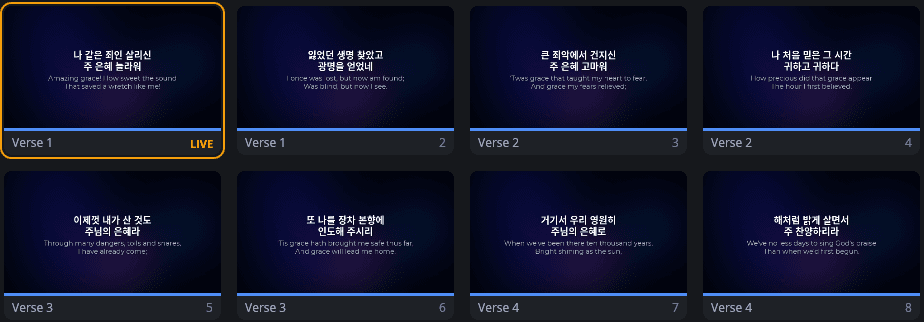
The slides of Amazing Grace in the operator window: eight bilingual Korean and English slides, labelled Verse 1 to Verse 4, the first one live.

Scripture from YouVersion

Show a passage in two translations at once. Passages you’ve fetched are saved, so they work offline on Sunday.

Slide decks, too

PDF decks become slides. PowerPoint, Keynote and Impress files are converted with LibreOffice when it’s installed, and images can be slides.

An announcements slide from an imported PDF deck, shown on the audience screen.
  • .pdf
  • .pptx
  • .key
  • .odp
  • images

Backgrounds that loop

Image and video backgrounds that loop seamlessly, audio, and crossfades on every layer. Video uses hardware decoding where your computer supports it, and the video engine is built in.

Themes with a live preview

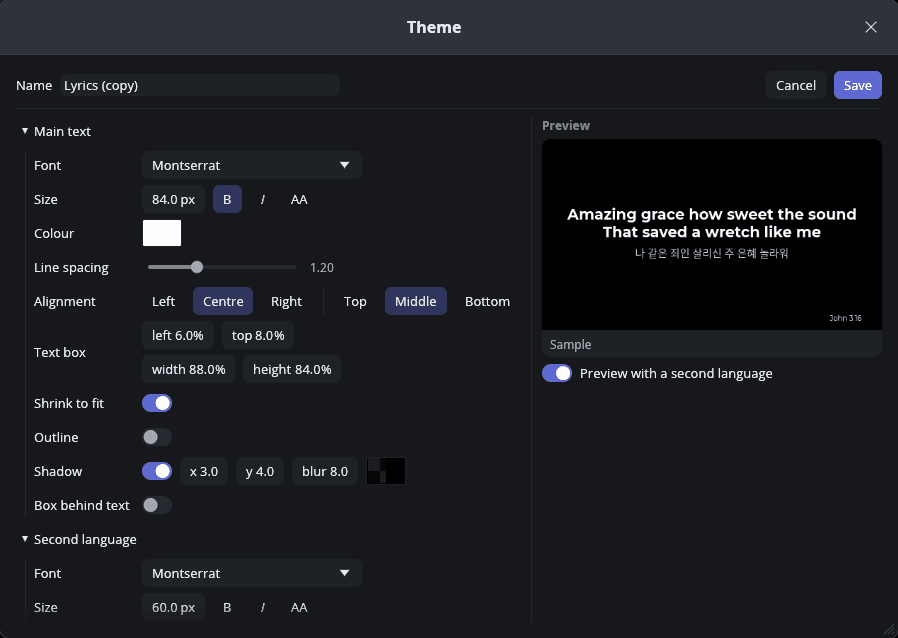
Change the font, size, colour, shadow or outline and watch the slide update as you go.

The theme editor: font, size, colour, alignment, shadow and second-language settings beside a live preview of a bilingual slide.

As many screens as you have

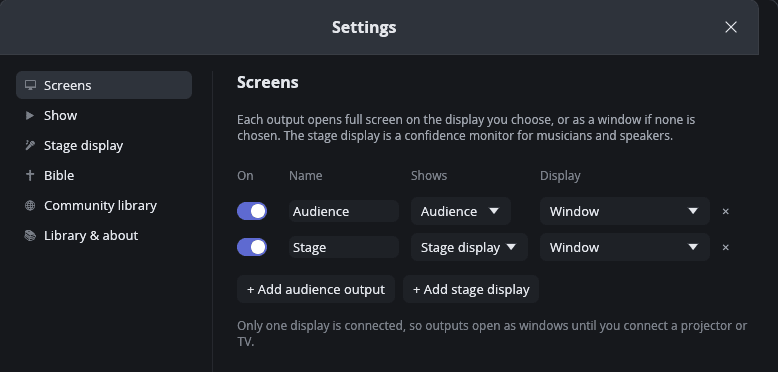
Audience screens go full screen on any monitor, next to a stage display and a live preview in the operator window. Add another output whenever you need one; with a single display, outputs open as windows.

  • Audience outputs
  • Stage displays
  • Live preview
Settings, Screens: an Audience output and a Stage output, each with a display picker, and buttons to add another audience output or stage display.
05Community library Coming soon

Share songs and translations with other churches.

A translation one church makes can serve many more. Search in any script, and each song appears in the language you searched in or picked.

  • One title, in your languageType “amazing grace” and you see English titles. Type 奇异 and you see 奇异恩典.
  • Filter by languageYour service’s languages come first, and More searches every language. A song shows up only if it has every language you pick.
  • Every language at a glanceA label like “한국어 +2” or “ไทย · English” shows what each song has, and the preview has a switch for each language’s lyrics.
  • Shared responsiblyUploaders confirm they have the right to share, and anyone can report a problem.

15 songs

    Try

    A working preview with demo songs. The churches are made up, and the non-English lines were written for the demo.

    The library’s server is built. It opens to churches soon, and the Community tab in the app will connect to it.

    06Built for Sunday morning

    Dependable when the room is full.

    Live presentation leaves no room for surprises, so Praise Vision is built to keep going.

    • Works offline

      Songs, media, themes and saved scripture all live on your computer, so the service doesn’t depend on the Wi-Fi.

    • The screens keep running

      If something goes wrong in the operator window, it’s logged and the screens carry on.

    • Screens come and go

      Unplug a screen and its output falls back to a window. Plug it back in and it moves back.

    • Everything included

      The video engine and its decoders come built in. There’s nothing else to install.

    • Native and GPU-rendered

      Written in Rust. Slides, text and video are drawn on the GPU, and the operator’s preview uses the same renderer as the screens.

    • No account, no tracking

      Your songs and services stay on your computer unless you choose to share one.

    Your library is plain files.

    Every song, service playlist and theme is a JSON file in your Documents folder, one per item. Back it up or sync it with any tool you already use.

    Documents / Praise Vision
    • Presentationsone file per song
    • Playlistsyour services
    • Themes
    • Backgrounds
    • Logs
    Alpha

    Praise Vision is in alpha.

    Alpha builds for macOS and Windows are coming to the public soon.

    • macOS

      Apple Silicon and Intel

      Coming soon
    • Windows

      Installer or portable zip

      Coming soon

    Everything it needs, including the video engine, comes in the download. It’s early software, so try it alongside your current setup before you rely on it for a service.

    07Questions

    Good to know.

    Who is Praise Vision for?

    Churches that put lyrics, scripture, slides and video on screens during a service, and especially churches that worship in more than one language.

    Which languages can a song have?

    Any of them. Over 120 languages are listed, from Afrikaans to Zulu, in their own scripts: type part of a name to find one, and if yours isn’t listed, add it by name. A song can have as many as you like, and two are on screen at a time. Romanization (pronunciation in Latin letters) is available for Korean, Mandarin, Cantonese and Japanese kana.

    Will my language’s script display?

    Arabic, Hebrew, Hindi and the other Indic scripts, Thai, Lao, Khmer, Myanmar, Tibetan, Amharic, Georgian and Armenian display in the operator window, as well as Chinese, Japanese and Korean. Praise Vision uses the fonts on your computer for them.

    Does it need an internet connection?

    No. Songs, media and themes live on your computer. Scripture needs a connection the first time you fetch a passage, and is saved after that. The community library, once it opens, needs a connection to browse.

    How does scripture work?

    Praise Vision fetches passages from YouVersion using a YouVersion Platform app key that you enter once in Settings. You can show two translations at once, and passages are saved so they work offline.

    Can I bring my existing songs and slides?

    Yes. Songs import from CCLI SongSelect files (.txt and .usr), OpenLyrics (.xml) and plain text. PDF decks become slides, PowerPoint, Keynote and Impress files are converted when LibreOffice is installed, and images can be slides too.

    What do I need to run it?

    A Mac (Apple Silicon or Intel) or a Windows PC. Connect a TV or projector for the audience, and another screen for the stage display if you like. With one screen, the outputs open as windows.

    Where is my library kept?

    In Documents/Praise Vision, as plain JSON files: one per song, service playlist and theme. You can back it up or sync it with any tool.

    When can I download it?

    Praise Vision is in alpha. Builds for macOS and Windows are coming to the public soon.